Imagine calling someone to fix a machine and only saying: "it does not work".
That person may be excellent. They may know PLCs, drives, robots, HMI, fieldbuses and those Friday-afternoon failures that always arrive with dramatic timing. But if all they receive is "it does not work", their answer will be experience plus intuition plus fog.
AI has the same problem.
A model can be very good at explaining code, spotting patterns or drafting screens. But if it cannot see the project, it is reasoning with its hands in its pockets. It may sound confident. It may even be right. But "may" is not a commissioning strategy.
The useful question is not: "can AI help with TIA Portal?".
The useful question is:
How do I give AI real TIA Portal project context
without turning the plant into an experiment?
That is where Eido TIA Workbench comes in.
0) The problem: TIA Portal knows a lot, but it does not expose it gently
A TIA Portal project contains a huge amount of information: blocks, UDTs, DBs, tags, screens, connections, scripts, alarms, text lists, states, dependencies and engineering decisions that often only make sense when viewed together.
The problem is that the project lives inside an environment designed for programming and commissioning, not necessarily for Git, an AI model or an external review to read calmly.
It is like having a very good engineering notebook, but bound with industrial glue. The answer is inside. Passing "the right page" to another tool is the hard part.
Without context
AI gives general advice: check signals, review alarms, verify permissions. Correct, but not very specific.
With context
AI can compare blocks, read tags, follow dependencies and explain why an import or a screen does not fit.
1) The idea: open a window, do not hand over the steering wheel
Eido TIA Workbench is not trying to let AI control the plant. It is not asking a model to decide about safety, standards or physical behavior either.
The idea is more modest and therefore more useful:
Export TIA Portal artifacts into a readable,
versionable and ordered form that can be reasoned about.
In other words: give AI something to see.
The model can be ChatGPT, Claude, Gemini, a local model or whatever a company chooses. The model name is not the essential part. The essential part is that it is not working blind.
2) What it extracts from the project
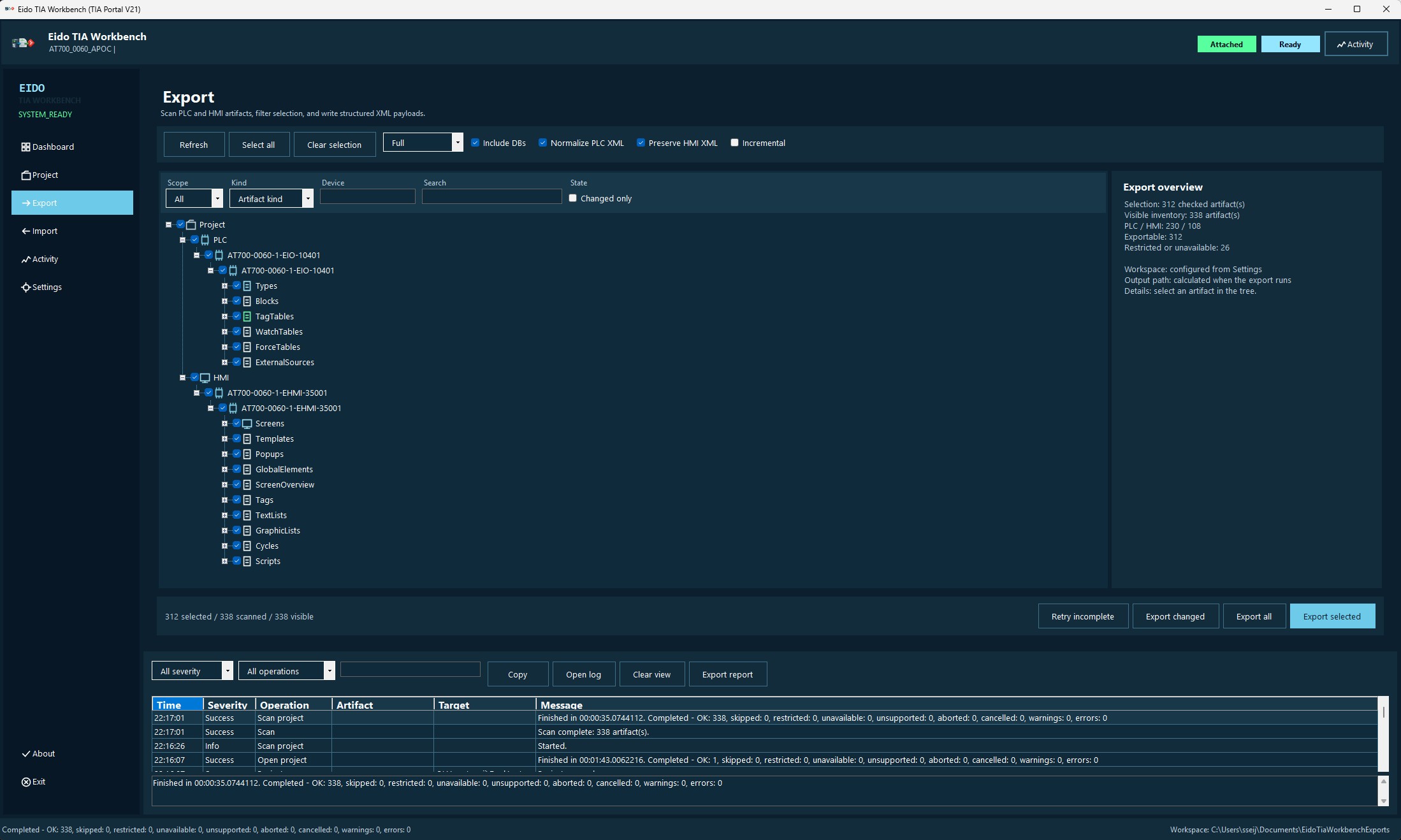
The tool uses TIA Portal Openness V21 to scan and export PLC and classic HMI artifacts. It is not just "dumping some XML". The useful part is exporting material with structure, status and traceability.
| Layer | What it gives AI |
|---|---|
| PLC | Blocks, types, tags, tables, dependencies and control structure. |
| Classic HMI | Screens, templates, popups, HMI tags, connections, text, scripts and lists. |
| Manifest | Artifact inventory, paths, export status, errors and unavailable items. |
| Reports | Operation summary showing what happened, what failed and what could be recovered. |
3) Troubleshooting: from "it does not work" to "test this hypothesis"
AI is especially useful when you ask it to compare, summarize, search for inconsistencies or organize an investigation.
For example, with a Workbench export you can ask more concrete questions:
- What changed between two versions of a block, and whether it affects a run condition.
- Which tags appear in a screen but have no obvious relationship to exported PLC logic.
- Which dependencies should be imported first to avoid errors.
- Which signals should be watched to test a fault hypothesis.
- How to explain a situation to maintenance without writing a technical horror novel.
This does not turn AI into the responsible engineer. It turns AI into a workbench: it sorts pieces, points at patterns and helps you avoid getting lost in the pile.
4) HMI screens: not just pretty buttons
An HMI screen is not decoration. A good screen answers plant-floor questions:
- Which state is the machine in?
- Which condition prevents the next step?
- What does the PLC expect from the operator?
- Which physical signal should maintenance check?
- How is the cycle recovered without strange rituals?
If AI can read tags, screens, scripts and exported PLC structure, it can propose a much more useful screen than if it only receives "make me a diagnostic screen".
It does not give you revealed truth. It gives you a technical draft worth discussing.
5) A prompt that is no longer blind
Act as a Siemens automation engineer.

Available context:
- manifest.json generated by Eido TIA Workbench
- XML for PLC blocks related to the station
- XML for classic HMI screens
- operation-report.txt

I want you to:
1. Summarize which artifacts seem involved in the station.
2. Point out suspicious dependencies, tags or references.
3. Propose a diagnostic HMI screen for maintenance.
4. List manual tests to validate the hypothesis.
5. Do not invent tags or blocks. If context is missing, say so.
The last line separates technical help from a confidence factory. In industry, a good answer can also be: "with the context provided, we cannot know".
6) Healthy limits
One sentence is worth repeating before getting too excited:
AI helps you think.
It does not certify that a machine is safe.
A reasonable workflow looks like this:
- Export with Workbench.
- Version with Git.
- Use AI to read, compare, explain or propose.
- Review with human engineering judgement.
- Validate in TIA Portal, simulation, bench testing, FAT or on site.
The tool prepares context. AI accelerates reading. The engineer decides. And the plant, as always, gets the final vote.
Conclusion
Eido TIA Workbench starts from a simple idea: if a TIA Portal project becomes easier to read outside TIA, several things improve at the same time.
Git becomes more useful because it can compare. Documentation becomes more useful because it can refer to real artifacts. Troubleshooting becomes more useful because context no longer lives only in the head of whoever programmed the line. And AI finally has something concrete to read.
The point is not letting AI command the machine.
The point is giving it a well-organized engineering notebook.